Yahoo Sports: Scores and News
- 4.7
- Rating
- 10.00M
- Installs
- Free
- Price

 Analysis by App-foxy
I usually open a sports app with a very specific problem: I want to know what is happening without spending ten minutes searching team pages, league sites, and video clips. That is where Yahoo Sports: Scores and News makes sense. It is a free sports app from Yahoo that brings scores, alerts, statistics, and highlights into one place, with coverage that includes NCAA, MLB, NBA, and other competitions. After using it as a quick companion during games and as a way to follow several teams at once, I found it most useful when I treated it as a personal scoreboard rather than a complete replacement for every sports source.
The first impression is straightforward. I can choose the teams and competitions I care about, then return to a stream of relevant updates instead of browsing through a general sports homepage. That sounds simple, but it changes the way I use the app. I do not need to remember which league page contains a particular match, and I can check a score in a few seconds when I am away from a television. The experience is particularly comfortable for someone who follows more than one sport and wants a single starting point.
From a busy day to the right score
My most realistic use case is a workday with several games taking place while I am occupied. I might be following an NBA team in the evening, checking an MLB result earlier in the day, and keeping an eye on NCAA action at the weekend. Instead of opening separate league apps, I use Yahoo Sports to establish a short list of teams and competitions. The important step is deciding what deserves an alert and what I only want to inspect manually.
You May Also Like

 AccuWeather: Weather Radar
AccuWeather Review: A Quick, Clear Forecast for Everyday Decisions
For everyday plans, the best forecast is the one you can understand quickly. AccuWeather makes rain timing, radar, and local conditions easy to act on, with a few trade-offs.

 Hill Climb Racing
Why Hill Climb Racing Still Turns Crashes Into One More Run
A tiny car, a bumpy hill and one more upgrade: Hill Climb Racing keeps resurfacing because its simple chaos makes every near-miss feel personal.

 AliExpress - Shopping App
AliExpress Makes Global Shopping Feel Personal, but Shoppers Bear the Risk
AliExpress turns a global marketplace into a pocket-sized discovery engine. Its reach is useful, its shopping loop compelling, and its trade-offs easy to miss.

 Lords Mobile: Kingdom Wars
Lords Mobile Is a Kingdom-Building Routine, Not a Quick Match
A case-by-case verdict on the building, battles, device demands, and social commitments that make Lords Mobile rewarding for some players and exhausting for others.

 PDF Scanner app - TapScanner
TapScanner Makes Paperwork Easier to Capture, Check, and Share
TapScanner makes scanning with a phone feel less like a rescue operation and more like a dependable step in getting work done. Its capture tools are useful, though not flawless.

 Block Blast!
 Shows How Much a Puzzle Game Can Leave Out
A quiet grid game shows why puzzle players increasingly value instant clarity, repeatable skill and low-pressure play—and where the genre still needs to catch up.
More From Our News Desk
View All News


That choice matters because sports notifications can quickly become noise. I prefer alerts for a team I genuinely do not want to miss, while leaving less important competitions available inside the app. This creates a useful division: notifications handle urgent moments, and the app itself handles browsing. If I enable everything, the convenience disappears under a constant stream of updates. The app works best when I curate it early rather than accepting every possible prompt.
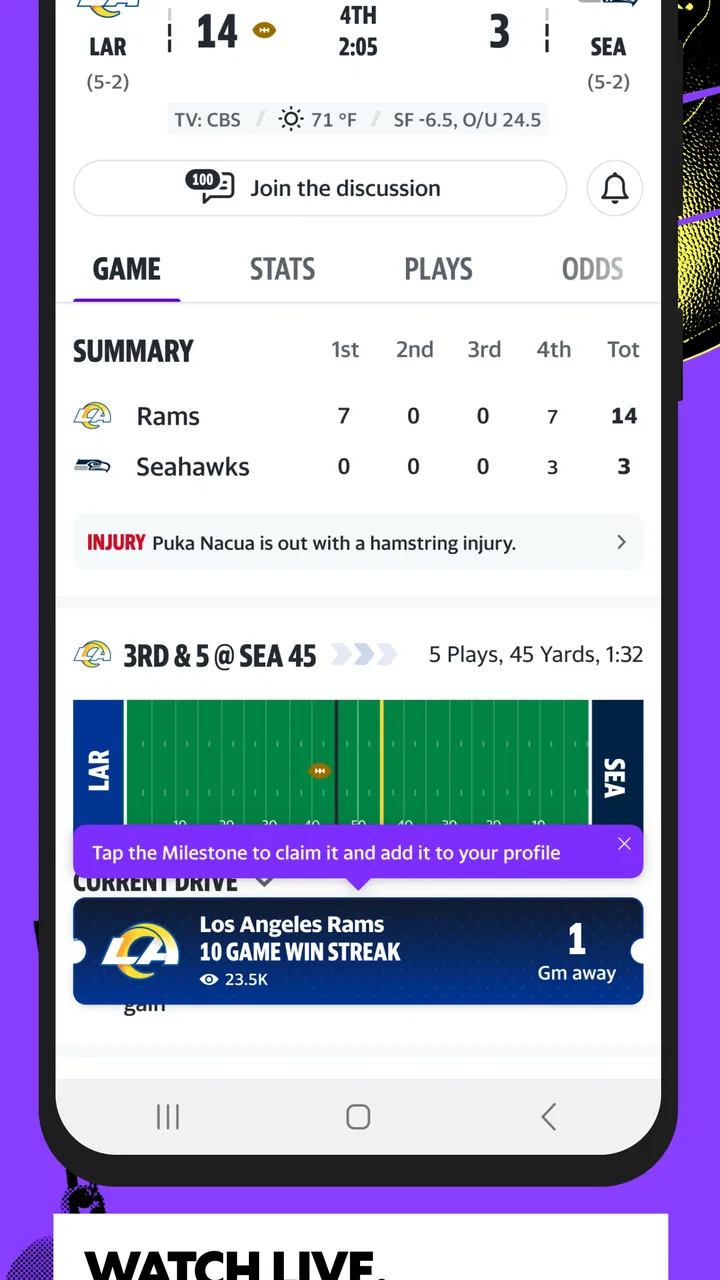
Once my interests are selected, the home experience becomes more personal. I can look for current scores instead of starting with a broad news feed, then move toward statistics or highlights when I have more time. The transition from a quick check to a deeper look is one of the better parts of the design. A score can answer my immediate question, while the surrounding information helps me understand how the game reached that point.
The quick-check routine I actually use
When I have only a few seconds, I open the app and scan the games connected to my teams. I am not trying to read every headline or watch every available clip. I want three things: whether the game is live or finished, whether the result has changed, and whether an important update deserves my attention. This makes the app useful on a commute, during a break, or while waiting for an appointment.
When I have several minutes, I follow a different route. I open the relevant game, inspect the available statistics, and then look for a highlight if I missed a key moment. That order is more efficient than beginning with video. The score tells me whether the contest is worth catching up on, while the statistics give context before I watch a short clip. It is a small workflow, but it prevents me from consuming random content without knowing why it matters.
The strongest habit is to use alerts as a handoff, not as the entire experience. An alert tells me that something changed; the app then gives me a place to verify the score and explore the event. If I only read notifications, I may miss the context. If I ignore them completely, I lose the app’s biggest advantage when I am away from live coverage.
Following several sports without losing the thread
Yahoo Sports is especially convenient for people whose interests cross league boundaries. A dedicated league app can be excellent when I am deeply focused on one competition, but it becomes less convenient when I switch from baseball to basketball or college sports. Here, I can keep those interests in one sports-focused environment and decide which team deserves priority.
The trade-off is depth. A specialist app may feel more focused for a single league, particularly if I want a very detailed team hub or a narrow news experience. Yahoo Sports is better for the handoff between sports: I can move from one competition to another without changing my entire routine. For a fan who follows one club obsessively, that breadth may feel unnecessary. For someone who follows several teams, it saves repeated setup and searching.
I also like that the app does not require me to make every visit a long session. It supports a glance-and-go pattern. That is important because sports apps often assume that users want to stay and scroll. My experience here is more practical when I use it as a tool for checking information, then close it when I have the answer.
What happens after an alert
The handoff from an alert to the app is where the product proves its value. Imagine I am in a meeting and receive a notification that a game involving my selected team has changed. I cannot follow the action immediately, so I wait until the next break, open the app, and inspect the score. From there, I can move to statistics or highlights rather than searching the web for a recap.
This workflow is useful because the initial alert and the later review serve different purposes. The alert protects me from missing the event. The game view helps me understand it. Highlights are particularly helpful when I missed a decisive sequence, although I still see them as a supplement to live viewing rather than a substitute for a full broadcast. A short clip can show what happened, but it cannot recreate the rhythm, commentary, or complete tactical picture of a game.
For that reason, I would not install this expecting it to replace a television service or a league’s full live-streaming product. Its role is information and catch-up: scores, alerts, statistics, and selected highlights. That distinction makes the app easier to judge fairly. It is excellent at reducing the distance between me and the latest result, but it is not the same thing as owning a complete live sports package.
Using statistics instead of guessing from the score
A final score can be misleading. A close result may have involved a dominant performance for most of the game, while a large margin may hide a strong first half followed by a collapse. I use the statistics section when I want more than a number. It gives me a better basis for deciding whether a highlight is worth watching or whether a headline deserves my attention.
This is also where the app becomes more useful for casual fans. I do not need to know every player or follow every match closely to gain context from the available numbers. A quick look can help me understand whether the result was expected, surprising, or shaped by one particular phase of play. The app does not turn me into an analyst, but it gives me enough information to ask better questions.
There is a practical trade-off here too. Statistics can make a quick check take longer than intended, especially when I start comparing several games. I recommend setting a purpose before opening a game page: confirm the result, understand the turning point, or find a highlight. Without that small discipline, a simple score check can become an unnecessary scroll through every available detail.
How I handle news and highlights
The news side is most useful after I have checked the scores. I prefer to see what changed first and then read the related story, because that gives the article a clear place in my day. If a team has won, lost, or produced an unexpected performance, the news can help me move from a result to an explanation.
Highlights work in a similar way. I use them when I need a fast visual summary, especially after missing a game. They are also useful for showing a friend what happened without asking that person to read a long recap. Still, I do not treat every clip as a complete account. A highlight naturally emphasizes memorable moments, so it can leave out the defensive work, slow stretches, and smaller decisions that shaped the result.
Compared with relying on social media, I find this workflow calmer. Social platforms can surface reactions quickly, but they also mix opinion, jokes, rumors, and unrelated posts. Yahoo Sports gives me a more organized path from score to statistics to news or video. The downside is that a social feed may feel faster for live conversation, so users who mainly want fan discussion may prefer another destination.
Who benefits most from this workflow
I would recommend the app to a fan who follows multiple teams, checks scores throughout the day, or needs a reliable starting point before deciding where to spend more time. It is also a good fit for people who miss live games because of work, school, travel, or family commitments. The combination of alerts and later catch-up makes those interruptions less frustrating.
It suits casual followers as well. Someone who watches major games but does not remember every schedule can open one app and get oriented quickly. The age rating is Everyone 10+, and the app is free, which lowers the barrier to trying it as a general sports companion. Yahoo is the developer, and the product has built a substantial audience: it has passed ten million installs, with an average rating of 4.7 from around two hundred eleven thousand ratings.
I would be more cautious about recommending it to a person who follows only one league and wants the deepest possible specialist experience. A league-specific app may provide a more concentrated environment for that purpose. I would also point elsewhere if the main requirement is guaranteed live video, full broadcasts, or a highly social match-day community. Yahoo Sports can support those interests indirectly, but that is not the same as making them its central job.
Small choices that make it less distracting
My first tip is to separate essential teams from occasional interests. Essential teams deserve alerts because I want the app to interrupt me for them. Occasional interests can remain available for manual checking. This keeps the notification layer useful instead of turning every game into an interruption.
My second tip is to open the score before opening a highlight. That sounds obvious, but it changes the value of the video. If I know whether a game is close, finished, or already decided, I can choose whether to watch a decisive moment or simply read the result. It is a better use of limited time than starting with whatever clip happens to be presented first.
My third tip is to use statistics as a verification step when a headline feels dramatic. A headline may emphasize a comeback or a standout performance, while the numbers reveal whether the contest was genuinely close. This does not require deep sports knowledge; it simply reduces the chance that I form an opinion from one memorable moment.
My fourth tip is to treat the app as a handoff between moments in the day. I might receive an alert while busy, confirm the score during a break, and return later for news or highlights. Thinking of those as separate stages makes the experience more flexible. I do not need to consume everything immediately, and I do not lose the thread just because I missed the live action.
Where the smooth experience starts to break
The biggest weakness is the tension between breadth and focus. Covering NCAA, MLB, NBA, and other sports is convenient, but a broad app can feel less precise than a dedicated league product. If I follow only one competition, some of the wider content becomes background rather than value. The app is strongest when I take advantage of its range.
Notifications can also become friction if I do not manage them carefully. Sports generate many natural update points, and receiving too many alerts makes me mute the entire app. That is not a failure unique to Yahoo Sports, but it affects whether the product remains useful in everyday life. The setup needs a little attention, and users who want a completely quiet experience may prefer manual checking through a browser or a single-team app.
Another limitation is the gap between a highlight and a full explanation. A clip is fast and engaging, but it cannot answer every question about a game. Statistics add context, and news adds narrative, yet neither replaces the complete experience of watching live. I see this as a clear boundary rather than a flaw: the app helps me keep up, while other services are better suited to full viewing.
The interface can also encourage me to move from one item to another when I only intended to check a score. That is convenient when I have spare time, but inefficient when I am busy. My solution is to decide what I need before opening the app and leave once that question is answered. Users who prefer a single-purpose scoreboard may find the broader mix less disciplined than they want.
My conclusion after using it as a daily sports companion
Yahoo Sports: Scores and News earns its place on my phone because it connects the stages of following sports: selecting teams, receiving an alert, confirming a score, checking statistics, and catching up through news or highlights. The result is not a full broadcast service, and it is not the deepest specialist tool for every league. Its strength is the practical middle ground between those extremes.
I would choose it when I want one free app for several sports and need quick answers during a busy day. I would skip it if my only goal were complete live coverage, constant fan conversation, or the most specialized experience for one competition. With notifications kept under control, it becomes a genuinely useful companion rather than another source of noise.
Yahoo Sports was released on June 28, 2016, and its continued popularity is easy to understand from this workflow. It removes repeated searching, gives missed games a manageable path back into the story, and lets me decide how much attention each result deserves. For me, that is the right reason to install it: not because it promises to replace every sports service, but because it makes the everyday act of keeping up noticeably easier.
FAQs for Yahoo Sports: Scores and News
01What is Yahoo Sports: Scores and News?
Yahoo Sports: Scores and News is a mobile app for following live scores, schedules, standings, statistics, and sports news in one place. It covers popular leagues and competitions, including major American sports and selected international events. The app is designed for quick updates, letting you check results, game details, headlines, and team information without opening several different sports websites.
02Which sports and leagues are available in Yahoo Sports?
Coverage can vary by country and may change over time, but Yahoo Sports generally focuses on sports such as NFL, NBA, MLB, NHL, college sports, soccer, golf, tennis, and other major competitions. Users can usually follow favorite teams, leagues, and events to personalize the information shown. Before downloading, remember that regional restrictions may affect which scores, news, or competitions appear.
03Can Yahoo Sports send live score and game notifications?
Yes, the app can provide notifications for selected teams, games, and important events, depending on the sport and your settings. You may receive alerts for starts, score changes, final results, breaking news, or other updates. Notifications are optional, so you can disable them entirely or customize them from the app and your device’s notification settings if they become excessive.
04Does Yahoo Sports offer live streaming or live game broadcasts?
Yahoo Sports is primarily intended for scores, news, statistics, schedules, standings, and game information rather than serving as a universal live-streaming platform. Some events or regions may include links, video clips, or streaming options, but availability depends on broadcasting rights and your location. A subscription to a separate television or streaming service may still be required to watch full games.
05Is Yahoo Sports free to download and use?
Yahoo Sports is generally free to download and offers many core features, including scores, news, schedules, standings, and notifications, without an upfront purchase. However, mobile data usage, advertising, regional limitations, or links to subscription-based streaming services may apply. You should also review the permissions requested during installation and check the current store listing for the latest pricing and availability details.
Pros
- Fast updates for scores
- schedules
- and breaking sports news.
- Personalized feeds help track favorite teams and leagues.
- Covers many major sports in one convenient app.
- Detailed game pages include stats
- play-by-play
- and standings.
- Free to download with useful features available without a subscription.
Cons
- Some leagues and regional content may have limited coverage.
- Frequent notifications can feel excessive unless carefully customized.
- Video and article availability may vary by location.
- The interface can feel crowded during busy sports periods.
- Some features may redirect to web pages instead of staying in-app.

Yahoo Sports: Scores and News
Gallery